


Medical records
3.757.00 Reviews
App Specs
- Version
- 1.2.4
- Updated On
- License
- Free
- Downloads
- 100,000+
- Developer
- Volodymyr Yerokhin
- Categories
- Medical
- Platform
- Android
Screenshots
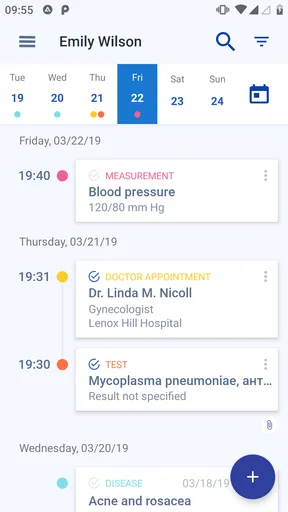
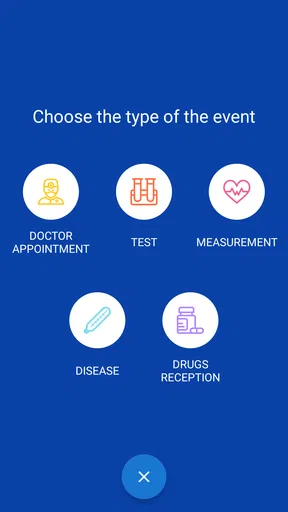
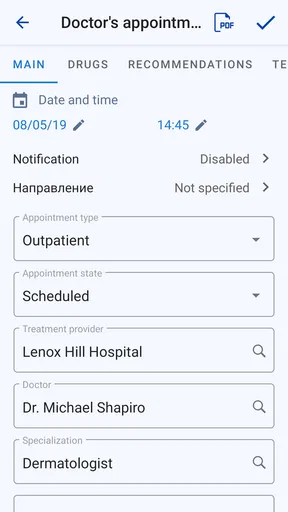
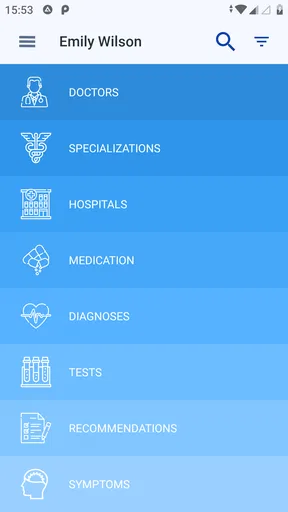
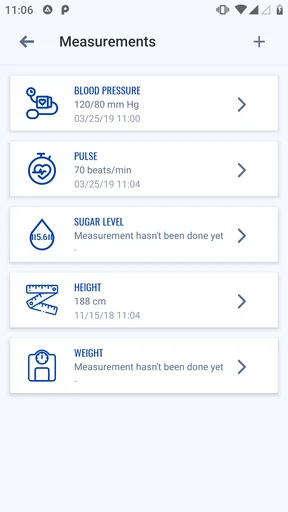
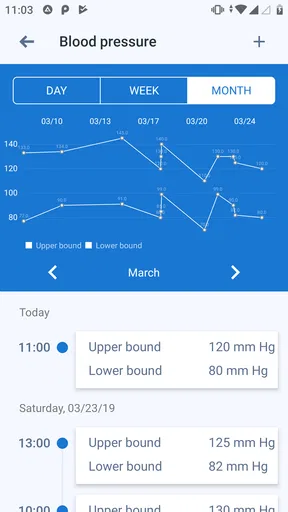
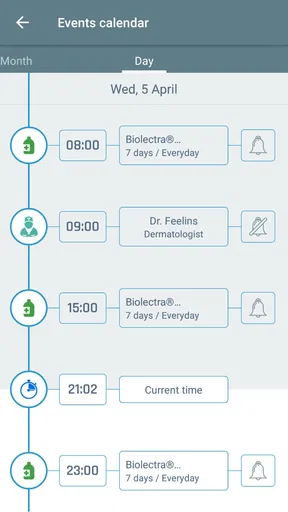
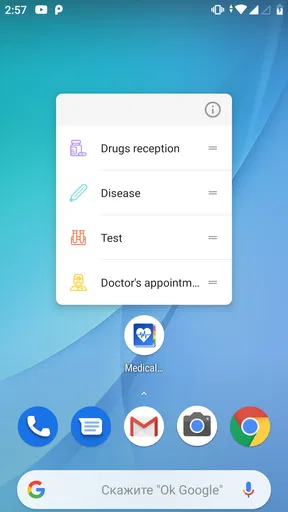
 Analysis by AppCompare
Keeping medical information close at hand sounds simple until a clinic asks about an old prescription, a previous diagnosis, or the date of a test I had done somewhere else. Medical records is designed for that particular problem: it turns an Android phone into a portable place for personal health notes. I see it as a practical organizer rather than a diagnostic tool, a doctor-on-your-phone service, or a replacement for a clinic’s official records.
That distinction matters. The app is free to start, is rated for Everyone, and comes from developer Volodymyr Yerokhin. It belongs to the medical category and has reached over 100 thousand installs, which suggests that the basic idea is useful to a meaningful group of people. At the same time, its average rating is 3.7 from more than 600 ratings, so I would approach it as a focused utility with some room for personal preference and possible friction, not as a universally polished health platform.
What I looked for before trusting it with health information
My first decision criterion was not the appearance of the interface. It was whether the app could help me answer ordinary questions quickly when I was away from my usual doctor. A useful electronic medical card should reduce the need to remember medication names, dates, and past events under pressure. It should also encourage careful organization instead of creating another pile of vague notes.
The second criterion was scope. Medical records makes the most sense when I treat it as a personal reference file. I would not use an app like this to decide whether chest pain is serious, to replace emergency care, or to interpret a symptom as a diagnosis. Its value is in keeping information available, not in turning that information into medical advice.
I also considered the type of information that benefits from being carried. A short medication history, allergies, previous procedures, recurring conditions, and important dates can be more useful than a long diary of every minor discomfort. The more deliberately I enter information, the more helpful the app becomes. If I fill it with incomplete entries and uncertain guesses, the electronic card can become confusing at exactly the wrong moment.
There is a practical privacy question too. A phone-based record is convenient, but convenience means the phone itself becomes important. I would use a screen lock, avoid entering information on a borrowed device, and think carefully before recording details that do not genuinely help with future care. I would also keep the app as a supplement to official records rather than assuming that a personal entry is proof of a clinical event.
A focused tool for building a personal health history
In my experience, the strongest reason to use this app is continuity. People often see different doctors, visit walk-in clinics while traveling, or change pharmacies. When the same health history is scattered across paper folders, email messages, and memory, even a basic personal record can make a conversation smoother.
Worth Reading Before You Choose

EA SPORTS FC Mobile 26 Is a Bigger Football Game, but It Takes Time

Flipboard Shows What News Apps Must Do Beyond the Feed

Switching to Android Auto Means Rethinking Your Driving Routine

Google Calendar Makes a Crowded Week Easier to Manage

Ludo King Makes the Most of the Minutes Between Plans

Baby Panda World Brings Quick Play to Modern Phones, but Its Game Library Feels Busy
A realistic example is a weekend trip after a recent change in medication. If I suddenly need medical attention, I may not remember the exact name or dosage while feeling unwell. Having my own record available could help me give a clinician a clearer starting point. It would not replace the clinician’s assessment, but it could prevent an avoidable gap in the conversation.
Another useful situation is preparing for an appointment. Rather than trying to reconstruct years of medical history in the waiting room, I can review what I have recorded beforehand and notice which details need checking. This is especially helpful when several family members, specialists, or pharmacies have been involved. The app can serve as a prompt for better questions, even when it cannot answer those questions itself.
I also think it can help people who care for an older relative, provided the phone and the information are managed responsibly. A caregiver may need a concise reminder of important medical details during a visit. The benefit is not that the app magically coordinates care; it is that a deliberately maintained record is easier to consult than scattered handwritten notes.
Small workflows that make the app more useful
The first workflow I recommend is entering information immediately after an appointment, not weeks later. I would record the event while the names and dates are still fresh, then review the entry against paperwork or instructions. This reduces the common problem of remembering the general idea but losing the exact detail that matters.
My second tip is to separate confirmed information from personal reminders. A note such as “ask whether this medicine can be taken with the other prescription” is different from writing that two medicines are incompatible. Keeping that distinction clear prevents a personal question from being mistaken for a medical conclusion.
A third useful habit is a pre-visit review. Before seeing a new clinician, I would scan the record for duplicate medication names, old entries that may no longer apply, and dates that need verification. This turns the app from a passive storage drawer into a preparation tool. The work happens before the appointment, but the payoff is a more accurate conversation.
I would also avoid making the record unnecessarily elaborate. A short, current list is often more useful than a large archive filled with uncertain details. If I am recording something because I feel I “might” need it someday, I would ask whether it will actually help a clinician understand my situation. That simple filter keeps the card readable.
What the version and pricing mean in everyday use
The current version is 1.2.4 and the app requires Android 6.0 or later, so it is aimed at a broad range of Android phones rather than only recent devices. That can be useful for someone who keeps an older phone as a dedicated health or travel device. I would still check the app’s behavior on my own phone before moving a large amount of information into it.
The app is free, but optional in-app purchases range from $0.99 to $5.49 per item. I would not decide based only on the word “free.” The important question is whether the free experience covers the record-keeping workflow I actually need, and whether any paid item removes a limitation that matters to me. Since medical information is personal, I would first try the basic setup with a small amount of non-critical information before committing to extras.
This pricing model may suit someone who wants to test the concept without paying upfront. It may be less attractive to a user who prefers a single, clearly defined purchase or who wants a full health-management ecosystem included from the beginning. The cost is not only monetary: learning a new system and maintaining it also take time.
Where it wins, and where another approach may fit better
I’d use this section to weigh the app’s focused personal record against paper, general notes, and broader health platforms, because the best choice depends on what I need at the moment I reach for it. The key question is whether a portable, manually maintained reference is enough for my routine; that also sets up a closer look at how much upkeep it asks of me over time.
Its advantage over paper notes
Compared with a paper card, a phone-based record is easier to carry and update. I am less likely to leave it in a drawer, and I can make changes after an appointment instead of crossing out old information on a small card. That portability is the central advantage, especially for travel or unexpected visits.
Paper still has one important strength: it can be handed over without depending on a charged phone or a familiar interface. For that reason, I would not throw away essential documents simply because I started using this app. A sensible setup can use the app for an organized personal reference while keeping official paperwork and critical instructions in their proper place.
Its advantage over ordinary notes
A generic notes app is flexible, but that flexibility can become clutter. Medical Records is more appealing when I want a dedicated place for health information rather than mixing prescriptions with shopping lists, work notes, and passwords. The separation itself can make review easier and reduce the chance of overlooking a health entry among unrelated text.
On the other hand, a general notes tool may be better for someone who needs to attach a wide variety of material or already has a carefully designed system. I would choose the medical app when the priority is a focused personal card, not when I need a broad document-management workspace.
Its advantage over larger health platforms
Some people want a complete health platform with appointment management, exercise tracking, symptom analysis, device data, or direct communication with providers. That is a different category of product. Medical Records appeals to me when I want something narrower and easier to understand: a personal place for medical information that I can consult myself.
The trade-off is that a focused record does not automatically become a connected care network. If my main goal is syncing information from devices, booking visits, or receiving clinical guidance, I would look toward a service built specifically around those functions. I would not choose this app simply because it carries the word “medical”; I would choose it only if a personal electronic card is the job I need done.
When I would skip it
I would skip this app if I expected it to verify my history with hospitals or pharmacies, provide emergency treatment instructions, or tell me what a symptom means. Those expectations belong to other tools and, in urgent situations, to qualified medical professionals. A personal record is only as accurate and current as the information I put into it.
I would also hesitate if I rarely need to manage health information and already have a reliable, secure system that I use consistently. Installing another app is not automatically an improvement. The real benefit appears when it replaces scattered notes or helps me prepare for appointments more reliably.
The cost of switching is mostly organizational
Moving from paper or a general notes app requires an initial cleanup. I would start with the information I am most likely to need: current medications, known allergies, major conditions, previous procedures, and contact details that are genuinely relevant to care. Then I would add older history in stages instead of trying to recreate everything in one sitting.
That staged approach is important because transcription errors are a real risk. I would compare each important entry with a prescription label, discharge document, or clinician’s instruction. If I am unsure, I would mark it as something to verify rather than silently treating memory as fact. The app can organize information, but it cannot correct an inaccurate source.
I would also make a maintenance routine. After a medication changes, I would update the record promptly. After a test or procedure, I would add the confirmed details when I have them. Every few months, I would review entries that may have become outdated. Without that routine, the app can give a false sense of readiness while quietly becoming stale.
Before relying on it during travel, I would open the record while offline, check that the important information is easy to find, and make sure my phone is charged. I would not wait until an emergency to discover that I cannot remember where an entry was placed. This is one of the less obvious trade-offs of any phone-based medical card: portability is helpful only when access is dependable.
My recommendation for different kinds of users
I recommend Medical Records to an Android user who wants a dedicated personal health organizer, is willing to enter information carefully, and understands the boundary between a record and medical advice. It is particularly sensible for people who travel, manage several prescriptions, visit different providers, or help coordinate information for a family member.
I would recommend trying the free version first and building a small, accurate record before considering optional purchases. The app’s Everyone rating makes it approachable for a wide audience, but the responsibility remains with the person entering and interpreting the information. For sensitive details, I would use normal phone security and share the record only with people I trust.
I would choose a different solution if I needed provider-connected records, automated health tracking, appointment features, or clinical decision support. I would also stay with paper or a trusted general note system if my needs are minimal and my existing method is already dependable. The right choice depends less on the medical label and more on whether I need a portable personal card.
After using it as a decision rather than a novelty, my view is cautiously positive. It solves a specific everyday problem: keeping useful medical history together when I am away from the place where that information was created. Its limitations are just as clear: it depends on accurate manual upkeep, it is not a substitute for official records or professional care, and optional purchases mean the free starting point may not be the entire experience.
My bottom line is simple: choose it for organized personal continuity, not for diagnosis or connected healthcare. If that is what I need, the focused approach is more practical than carrying loose notes. If I want a full digital health service, I would look elsewhere. For the right user, Medical Records can be a modest but genuinely useful companion for appointments, travel, and those moments when remembering the details matters.
Pros
- Keeps medical history organized in one accessible place.
- Makes it easier to share records during appointments or emergencies.
- Can help users track medications
- allergies
- and past treatments.
- Reduces reliance on scattered paper documents and folders.
- Useful for preparing questions before speaking with a healthcare provider.
Cons
- Privacy depends on the app’s security and data-handling practices.
- Some features may require manual entry or regular record updates.
- Imported documents may not always be categorized accurately.
- Access can be limited when there is no internet connection.
- The app does not replace professional medical advice or diagnosis.
FAQs for Medical records
What is the Medical Records app used for?
Medical Records is designed to help you organize important health information in one convenient place. Depending on the version and available features, you may be able to store details such as diagnoses, medications, allergies, appointments, test results, vaccination history, and doctor contacts. It is mainly a personal organization tool and should not replace professional medical advice, diagnosis, emergency services, or official records maintained by healthcare providers.
Is my health information safe and private in Medical Records?
Before entering sensitive information, review the app’s privacy policy, permissions, and security options carefully. Look for features such as device encryption, password or PIN protection, biometric access, secure backups, and clear data-deletion controls. Privacy practices can vary by developer and platform, so avoid assuming that all information is automatically protected. Do not store highly sensitive details unless you are comfortable with the app’s data handling policies.
Can I use Medical Records to communicate directly with my doctor or hospital?
Medical Records may help you keep information ready for a medical appointment, but it does not necessarily connect directly with your doctor, hospital, pharmacy, or national health system. Some apps support exporting, printing, or sharing selected records, while others are intended only for personal use. Confirm whether the app supports the file formats and sharing methods required by your healthcare provider before relying on it.
Can Medical Records replace official medical records or a patient portal?
No. A personal medical-records app should generally be treated as a supplementary organizer rather than an official source of clinical information. Healthcare providers maintain their own records, which may include professional notes, prescriptions, imaging, laboratory results, and legally required documentation. Keep your personal entries accurate and updated, but always verify important information with your doctor or through the official patient portal.
What should I check before downloading and using Medical Records?
Check the app’s developer, recent update history, user reviews, required permissions, subscription terms, advertising practices, backup options, and export functionality. Make sure it works on your Android or iOS version and understand whether features require an account or payment. You should also confirm how to recover your data if you change phones, uninstall the app, lose access to your account, or decide to delete your records.


